Theo Reilly interviews Seth Kenvin about his creation, there.app – the event platform that wants to upgrade from disorganised group chats.
I was recently at IBTM World. Arriving in Barcelona was a familiar scene – standing like a tourist with phone in hand, scrolling through plans and schedules. The hotel reservation was on an email, dinner plans were in a WhatsApp chat, meeting times were in a Calendar invite and some related internal chats were on Slack.
In a (somewhat) new place, ping-ponging between apps, trying to get my bearings. All this before the event had even begun, at which point it became a case of digging through email chains and shared drives, trying to remember where a file was saved.
For many, this is a genuine pain point. So, naturally, I was interested when Seth Kenvin, Silicon Valley marketer-turned-founder, pitched me his idea to resolve exactly this issue.
The right tool for any job?
there.app aims to be the Swiss army knife of event operations. The USP is stop event professionals from having to juggle a dozen different apps, giving them a single platform with everything they need.
How does it work?
The platform is called there.app. It is essentially a central control room for teams attending or exhibiting at an event. You start a project for the event, everyone on the team joins that project, and all the key info is contained within it. The schedule, documents, relevant locations (in the app’s own map), chats, tasks, contacts are on one platform.
So instead of 10 apps, you have one app with 10 features.
Is there.app really the tool needed to plug this apparent gap in the events market? We’ll run through a step-by-step process of how the app works, and consider the benefits and potential challenges of introducing this platform to the world of events.
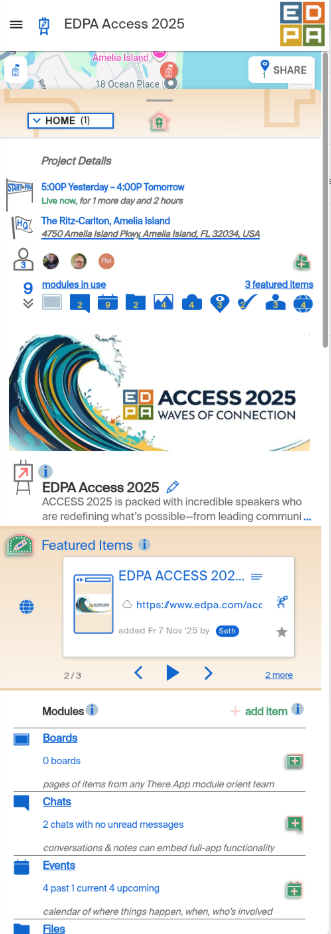
there.app Home page
Step 1: Someone creates a project
A colleague creates a project for an event. The example we’re using here in the images you see is EDPA Access 2025 – an event that Seth and co attended recently. Once the project is created, on the Home page of the event, they can add:
Dates of the event
Main HQ location – in this case the hotel
A description – of the event, goals for attending, etc
A cover image if desired
This is the front page everyone sees when they join.
Step 2: Invite the team
The lead invites everyone involved, so they all have access to the same dashboard.
Step 3: Add the schedule
In a separate “module” (the various app features are divided into these modules) called Events, the team can add calendar items with information like who’s attending and where it’s being held (on the in-app map). These calendar items could be:
Client meetings
Networking receptions
Internal team briefings
Dinners and side events
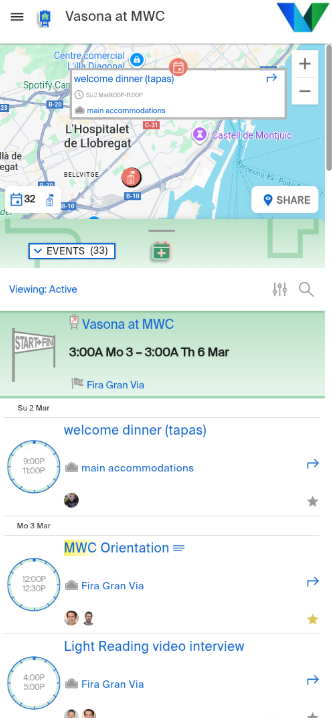
there.app Events module
The crucial element here is the location feature. For each event in the schedule, you can add a location. So, you see pins for where each event is taking place, with an in-app map. From my own perspective, this would stop me having to bounce between calendars/emails/messages and Google Maps.
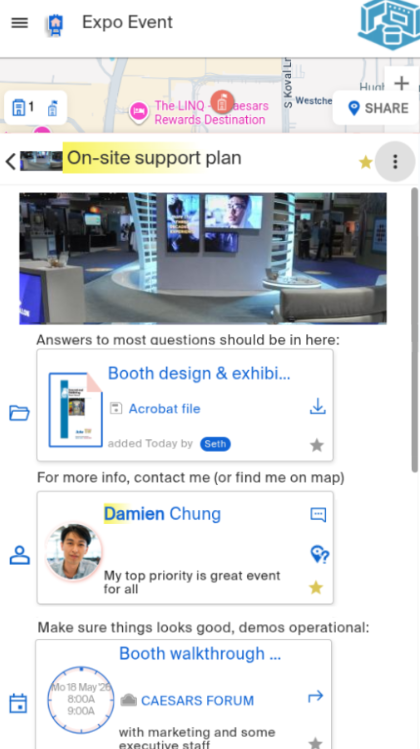
The Boards module
Step 4: Gather key info on a “Board”
On the “Board” module, you can add important info from any of the other modules. In the below example, we have a planning document from the “Files” module, a key contact for quick access from the “Team” module, and a walkthrough plus launch-meeting from the “Events” module.
Step 5: Store documents in one place
We also have the “Files” module – one centralised location where the team can add:
Marketing materials
Venue floorplan
Speaker briefing documents
Session agendas
Step 6: Chat with attending colleagues
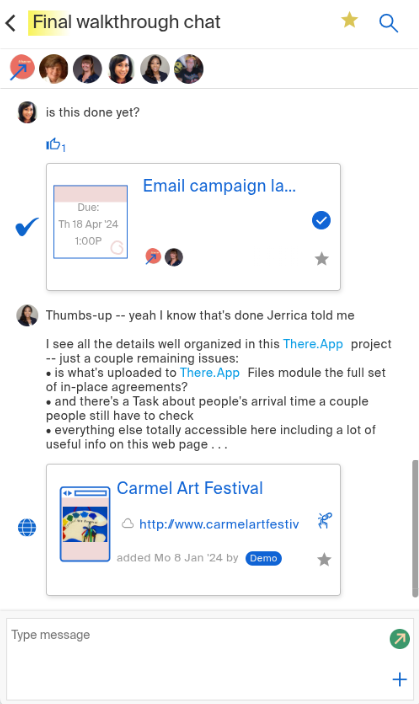
The Chat module
In my experience, when teams are attending an event, they usually create a WhatsApp group chat. It’s the easiest way to start a conversation with everyone in attendance.
There.app has its own “Chat” module. This may be the most ambitious of all of the platform’s features, as I predict that getting people to chat on there.app could be a real challenge, given how habitually we use our social media apps of choice. With that said, if there.app is being used for every other event-related need, it might be easier for convenience’s sake to hop over to a different tab than a different app. And perhaps keeping everything in one place will be preferable.
Indeed, the “Chat” module offers some things that WhatsApp doesn’t. Someone can drop a task into the chat, which others can then tick off once completed.
Step 7: See where people are
Location, Seth tells me, is one of there.app’s main USPs. One of the modules of the platform is called “Share”, which allows you to share your location with other team members for a given period of time. This means that you have pins for the venue, hotel, any other key locations, and your team members all on one map.
Step 8: Using Home as a dashboard
At any point, tapping Home takes you back to:
Basic information (dates, ‘HQ’, event description)
Featured items (whatever the team wants to highlight – key docs, contacts etc)
A dropdown menu with all modules
Getting people to change their processes
My main concern is about getting people to change their ways. It’s no easy feat to get people to adopt a new all-in-one platform, when they’re so used to using their armoury of apps and tools. How is there.app preparing to uproot the corporate processes of event professionals?
It’s all about the value proposition, Seth tells me. He agrees that it will be a significant challenge to get busy professionals to take that initial leap and give up their time transitioning from tools they know to a tool they don’t.
“Recognising practices in place to organise event operations, we openly integrate with existing resources and systems, plus our modularity supports adopting the most relevant and timely there.app capabilities with a path to upgrade and expand over time,” he says. “The plan is to scale up gradually, to let the strength of the platform speak for itself. We’ve already had good feedback from the event professionals that have tried it in the US. We think that through word of mouth and localised messaging the news will spread – that here is a platform that’s just easier to use in so many ways.”
What event professionals have said so far
So far, use cases are fairly limited. There.app has been tested out by a circle of event professionals from trade show agencies, photographers, videographers, festivals, travel planners, symposium, and wedding planners. Having said that, the initial testimonials are promising.
Keith Johnston, managing partner at i3 events, has this to say:
“As an agency that lives and dies by real-time communication, there.app is one of the few tools that actually makes event operations easier instead of more complicated. It pulls teams out of the chaos of WhatsApp threads, texts, Teams messages, and every other rogue channel, and puts everyone – producers, GCs, I&D crews and organisers – on the same page.
“It’s not just a place to store run sheets, site maps, and day-of documents. It’s a command centre. When teams can see the same information, in the same place, at the moment they need it, the entire production runs smoother. That’s the value of there.app: clarity, speed, and fewer ‘Where’s that file?’ messages at 5 a.m.”
What’s next?
Seth and his event industry advisor Christopher Kappes have an exciting journey ahead. I ask them what’s next for there.app.
“This,” Seth says, alluding to the interview we’re currently doing. “Getting the word out in whatever way we can. Getting published, speaking at events, marketing. I think we’ve built a product that can support any type of event. Now it’s a case of letting everyone know that it exists.”
They’re certainly not sitting idle. Less than a week after our chat, Seth and Chris are jetting off to Florida for the EDPA Access conference – an event centred on “experiential design” in the events industry. No doubt they had their networking hats on to engage with industry players and let them know what they’ve been busy working on.
I for one am looking forward to seeing where there.app goes. It’s an interesting time to introduce such a concept – as event professionals are up to their necks in new apps and digital tools. With the right messaging and a bit of elbow grease to clear that first hurdle of early adoption, I can see the platform going far.